
Product
QuickBooks Desktop Cloud Access, Now with AI
QBWebSync connects QuickBooks Desktop to a secure web portal, so your team can work with customers, vendors, invoices, bills and reports from any browser. Your company file never leaves your PC: a lightweight agent mirrors it to the portal and writes your edits back to QuickBooks automatically — no remote desktop, no hosting, no IT headaches.
It now includes AI that does the typing. Bill capture reads an uploaded vendor bill and fills in the Enter Bills form for you, and Ask your books answers plain-English questions about your company's data, with sources. The AI never changes QuickBooks by itself — a person reviews and clicks Save.

What's included
- Two-Way Sync
- No Remote Desktop
- Live QuickBooks Reports
- AI Bill Capture
- Ask Your Books
- Multi-Company & Multi-User
- Free Demo
New: AI that does the typing
Two AI features built into the portal. They are on by default, an Admin can turn them off, and neither one ever changes QuickBooks on its own.
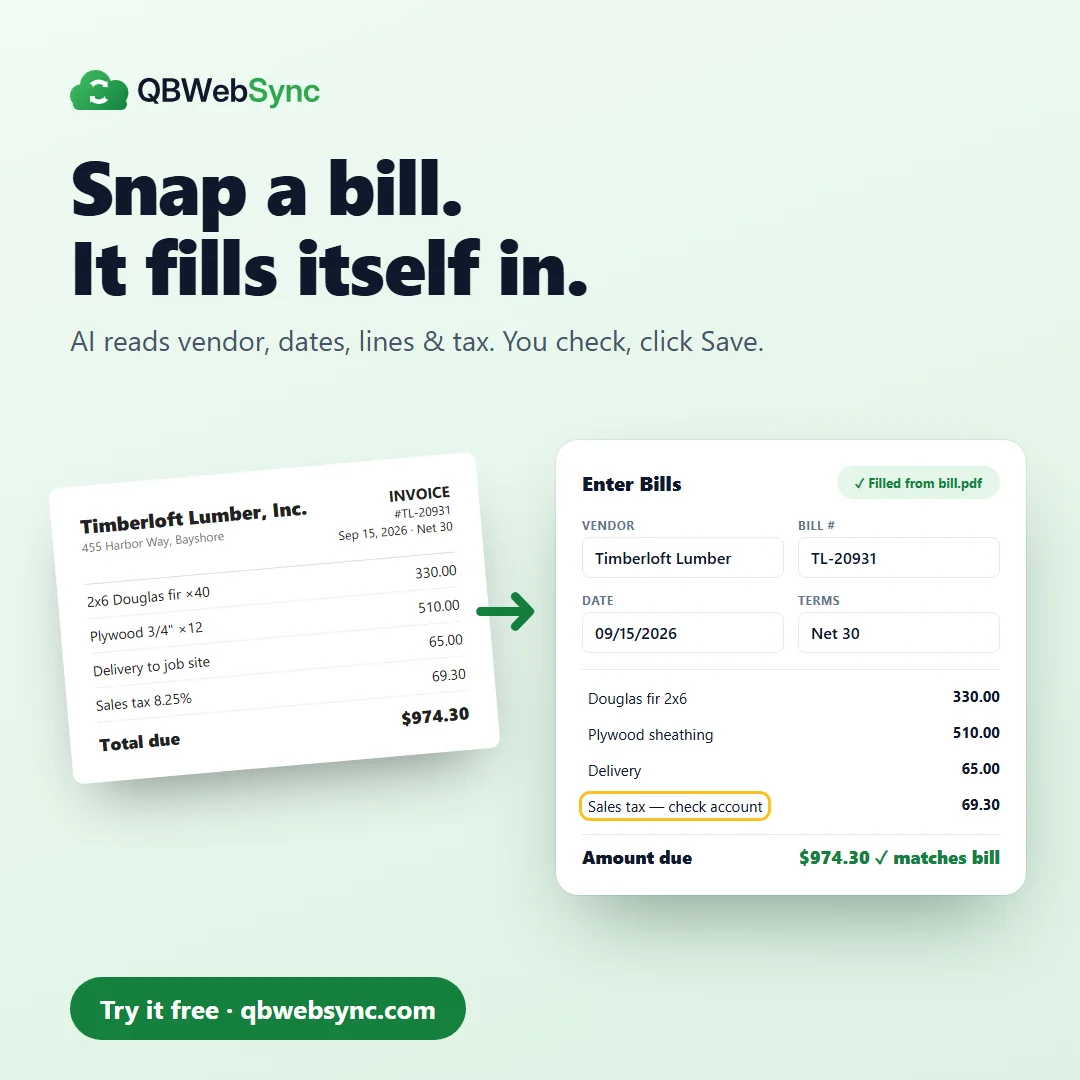
Bill capture — snap a bill, it fills itself in
Upload a vendor bill as a PDF, JPG or PNG. The AI reads the vendor, bill number, dates, terms, lines and tax and pre-fills the Enter Bills form, highlights any field it is unsure of, and checks the amount against the bill's total. You review it and click Save.
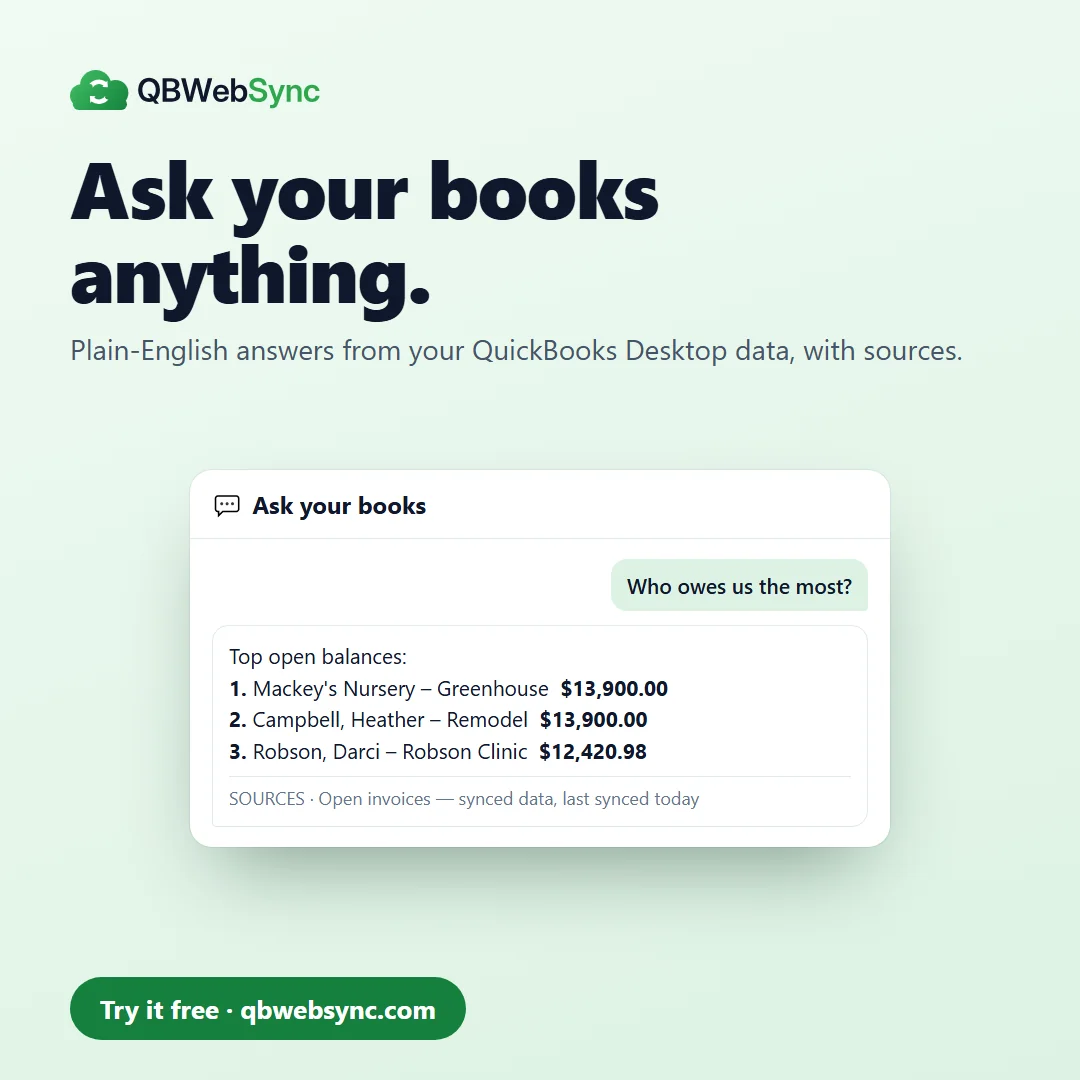
Ask your books — plain-English answers
Ask “Who owes us the most?”, “Which invoices are overdue?” or “What do we owe vendors?” and get an answer from your synced data and live QuickBooks reports. It is read-only, and every answer shows its sources and when the data last synced.
AI you stay in control of
- The AI never writes to QuickBooks by itself
- Nothing is saved until a person reviews it and clicks Save
- Saved bills reach QuickBooks through the normal sync
- Fields the AI is unsure about are highlighted for review
- Ask your books is read-only and shows its sources
- Daily and monthly usage limits per organization
- An audit log of every AI request for Admins
- An Admin can turn AI off at any time
Everything in QuickBooks Desktop, working in the cloud
Your company file stays on your PC. A lightweight agent mirrors it to a secure, multi-user portal and writes your edits back to QuickBooks automatically.
True two-way sync
Create or edit customers, vendors, items, invoices, payments and bills in the portal. Changes flow back to QuickBooks, with echo suppression and conflict detection so nothing double-posts.
Automatic background sync
Outbound changes reach QuickBooks about every 15 minutes, and you can pull the latest from QuickBooks on demand. Watermarks and a deletion sweep keep both sides reconciled.
Live financial reports
Profit & Loss, Balance Sheet, A/R and A/P Aging, Customer and Vendor Balances and QuickReports — pulled live from QuickBooks and exportable to Excel, PDF or print.
Multi-company, multi-user
Manage several company files and give your team role-based access. Owners, bookkeepers and accountants all work from the same live data, from anywhere.
Secure by design
Data is encrypted in transit and isolated per organization, and your QuickBooks credentials never leave your machine. The agent connects out only — no inbound ports to open.
No remote desktop, no IT
Skip hosting and RDP sessions. Installing a self-contained agent on the PC that runs QuickBooks is the entire setup.
Set up in about ten minutes
No servers to configure and no company file to move.
- 01
Install the agent
Download the self-contained QBWebSync agent and run the installer on the PC where QuickBooks Desktop lives. It bundles everything it needs.
- 02
Approve and pair
Approve the one-time connection in QuickBooks. The agent pairs your company file to your portal over a secure outbound link — no ports opened.
- 03
Work from anywhere
Open the portal in any browser to view lists, enter transactions and run reports. Edits sync back to QuickBooks automatically.
Inside the portal
A familiar QuickBooks layout, rebuilt for the browser.
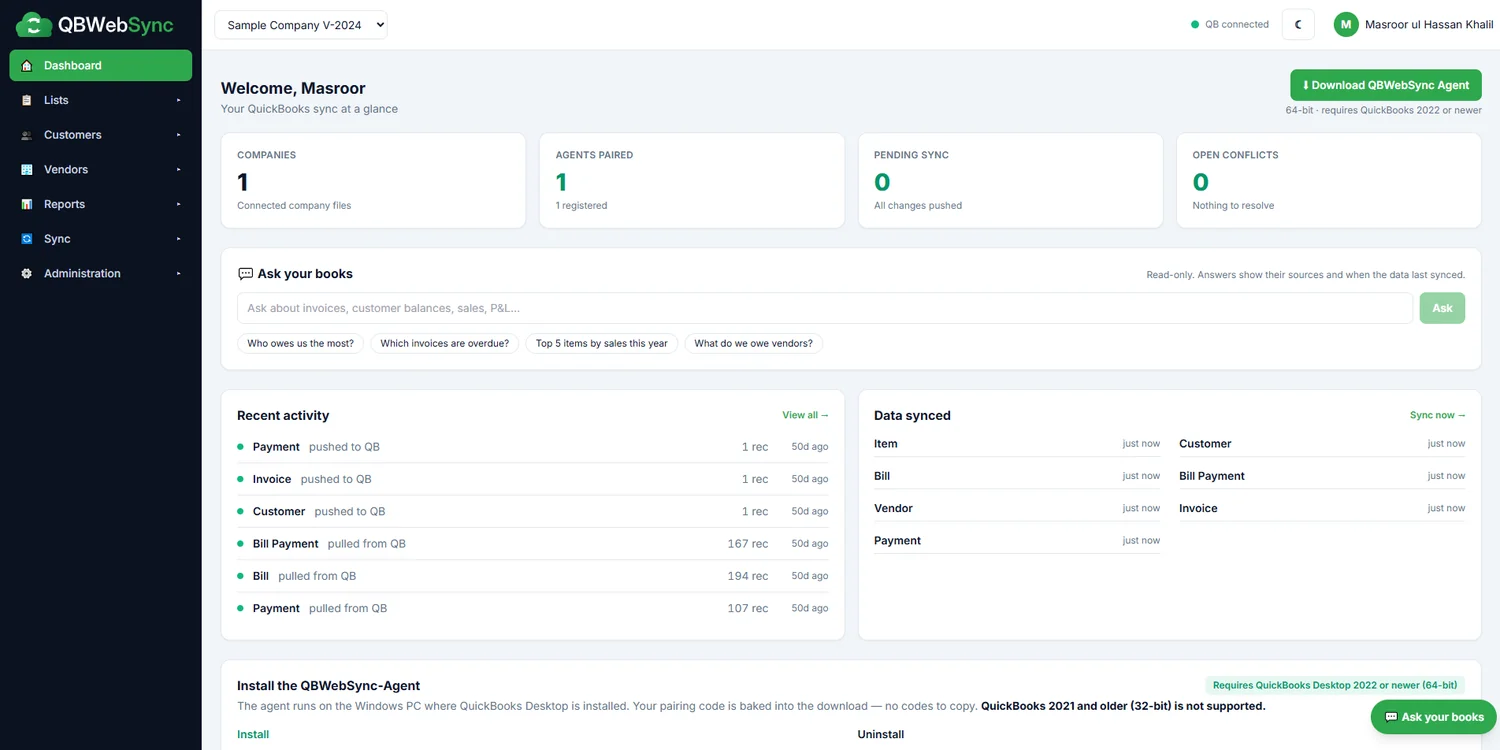
Dashboard
Sync status for every company file, recent activity, and Ask your books one click away.
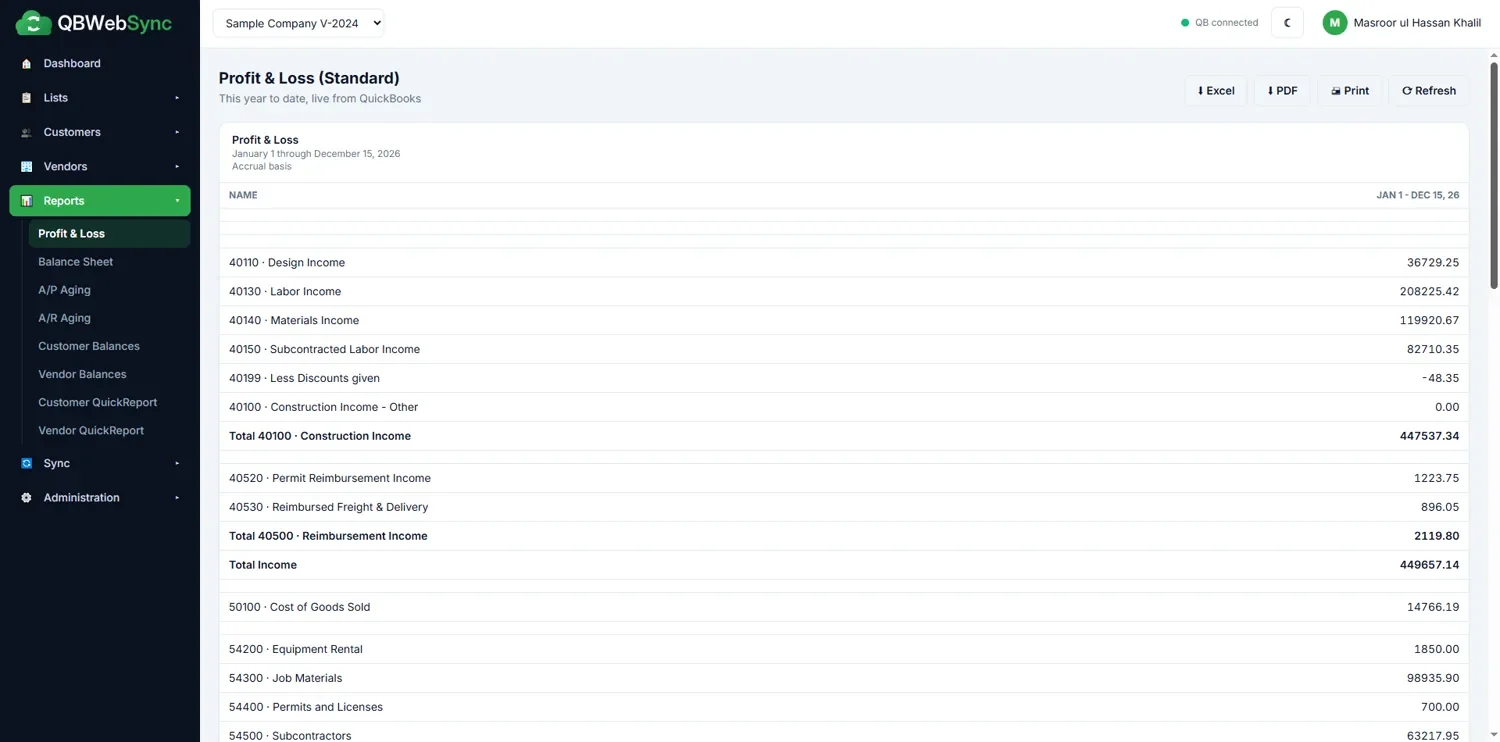
Live reports
A Profit & Loss pulled fresh from QuickBooks, ready to export to Excel or PDF, or print.
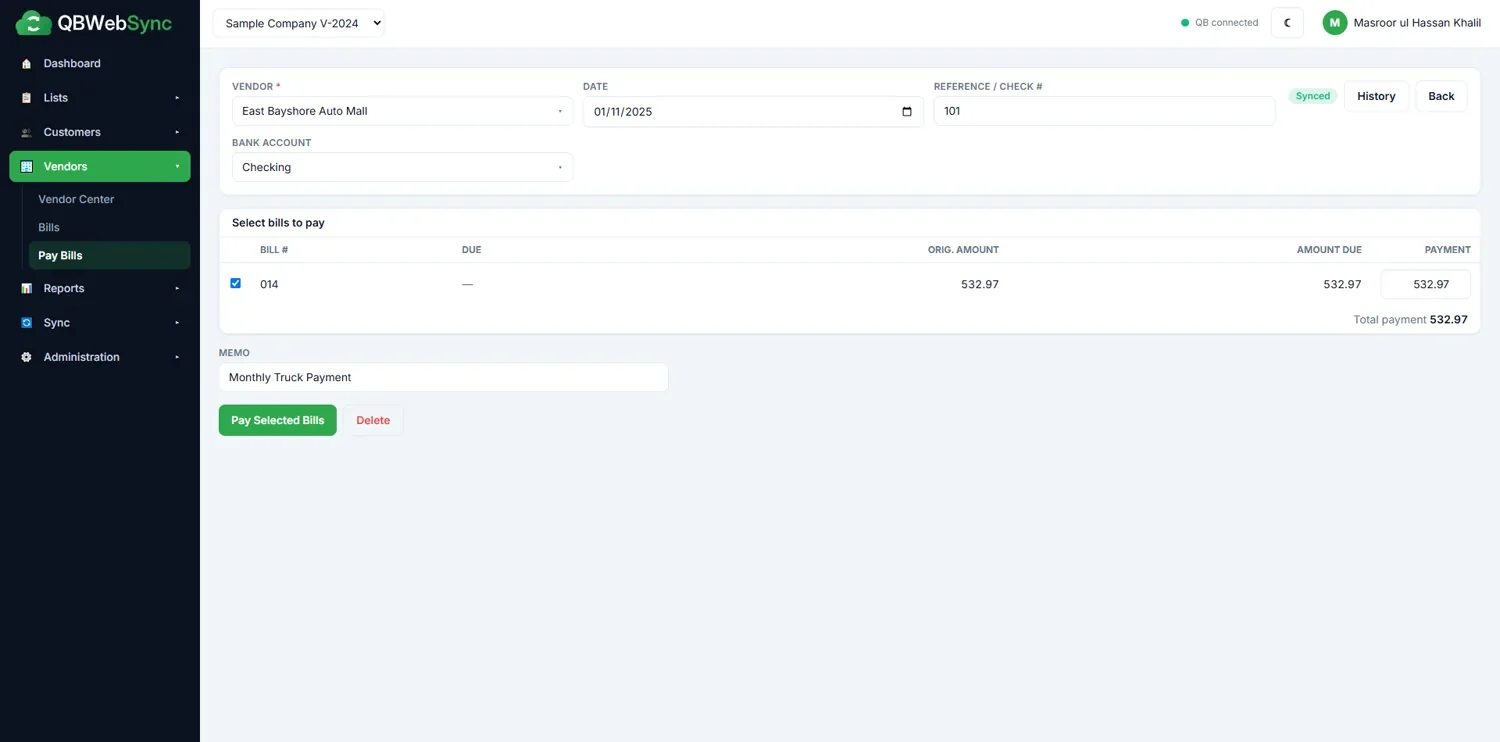
Enter and pay bills
Record bills and pay them in the portal; each transaction posts to QuickBooks on the next sync.
See a full sync in about two minutes
From installing the agent to running a live Profit & Loss — the whole workflow, start to finish.
Cloud access vs hosted QuickBooks Desktop
Hosted QuickBooks Desktop moves your company file to someone else's server and puts you behind a remote desktop session, with the cost and maintenance that comes with it.
QBWebSync keeps QuickBooks Desktop and your company file exactly where they are. The agent syncs the data to a web portal your team opens in any browser, so you get cloud access without hosting, remote desktop or changing accounting software.
Who it is for
- Business owners who need their numbers while away from the office
- Teams working from different locations
- Bookkeepers and accountants who need access to client data
- Businesses looking for an alternative to hosted QuickBooks Desktop
QBWebSync questions
Something not covered here? Ask us directly.
Does QBWebSync move my company file to the cloud?
No. Your QuickBooks company file stays on your PC. A lightweight agent reads and writes to it locally and mirrors the data to your secure portal, so you keep full control of the original file.
Which versions of QuickBooks are supported?
QuickBooks Desktop 2022 or newer (64-bit) — Pro, Premier and Enterprise. The agent installs on the same Windows PC that runs QuickBooks. QuickBooks 2021 and older (32-bit) is not supported.
Is it really two-way?
Yes. Edits made in the portal — new customers, invoices, bills, payments and more — are written back to QuickBooks automatically, with echo suppression and conflict detection so records never double-post.
Do I need to open ports or use remote desktop?
Neither. The agent makes a secure outbound connection only, so there is nothing inbound to configure, and there is no RDP or hosting to manage.
What do the AI features do?
Bill capture reads an uploaded bill (PDF, JPG or PNG, up to 10 MB) and pre-fills the Enter Bills form. Ask your books answers questions about your company's data from synced records and live QuickBooks reports, and shows its sources.
Can the AI change my QuickBooks data?
No. The AI only suggests values in a form or answers a question. Nothing reaches QuickBooks until a person reviews it and clicks Save, and saved changes go through the normal sync.
What data is sent to AI providers?
The bills you upload, the questions you type, and the company data needed to answer them, such as names, amounts and balances. The in-app AI notice names the current providers and their terms — at present free-tier access, under which submitted content may be used to improve the providers' products and may be reviewed by people. Our Privacy Policy explains what we keep.
Can we turn the AI off?
Yes. AI is on by default, and an Admin can turn it off at any time under Administration → AI Features, where usage and an audit log of every AI request are also shown.
Is a free demo available?
Yes. Start a free demo with no credit card and see your own company data in the portal before committing.


Next step
Ready to move forward with QBWebSync?
Tell us about your current process and what you need the software to do. We will come back with a practical approach, a timeline and a cost.